Help with bricked Omega 2+
-
Not sure what to run from command line, here's the result of
printenv:Omega2 # printenv bootcmd=tftp bootdelay=5 baudrate=115200 ethaddr="00:AA:BB:CC:DD:10" ipaddr=192.168.8.8 serverip=192.168.8.1 stdin=serial stdout=serial stderr=serial Environment size: 150/4092 bytes
-
@Zendog said in Help with bricked Omega 2+:
The web UI updates with Your file was successfully uploaded!, here is the serial output:
Data will be downloaded at 0x81000000 in RAM
Upgrade type: firmware
Upload file size: 173124 bytes
Loading: #######################################
#######################################
#######################################
####HTTP upload is complete.
Upgrading...
- FIRMWARE UPGRADING *
- DO NOT POWER OFF DEVICE! *
Judging by the serial output, it looks like you used the firmware upgrade web page to try to upgrade the bootloader.
When following the procedure at https://docs.onion.io/omega2-docs/Web-Recovery-flash-bootloader.html:
- make sure to go to http://192.168.8.8/uboot.html in Step 5
- Then, the serial should output messages indicating u-boot is upgrading:
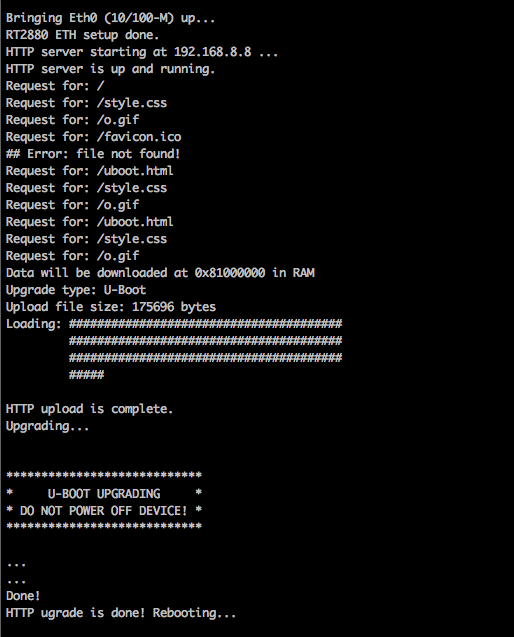
-
@Lazar-Demin Thanks for the update.
So I thought you said that my bootloader was out of date. So I followed the instructions at:
https://docs.onion.io/omega2-docs/Web-Recovery-flash-bootloader.html
So I downloaded
uboot-omega2p-20221118.binand applied theubootupdate.To do so, I started web recovery mode, selected
uBoot Updatewhich says:You are about to update the uBoot bootloader on the Omega. Select the .bin file from your computer and click the Update! button.The URL in the browser now reads
http://192.168.8.8/uboot.html.I select the file previously mentioned, then click
Upload!.These are the results:
Data will be downloaded at 0x81000000 in RAM
Upgrade type: U-Boot
Upload file size: 173124 bytes
Loading: #######################################
         #######################################
         #######################################
         ####

HTTP upload is complete.
Upgrading...


****************************
*     U-BOOT UPGRADING     *
* DO NOT POWER OFF DEVICE! *
****************************

raspi_wait_ready: read_sr fail: 0
## Error: HTTP ugrade failed!
So I've followed the suggestion to upgrade the bootloader via the information that you suggested.
File data on my file system for
uboot-omega2p-20221118.bin:ls -l Downloads/uboot-omega2p-20221118.bin -rw-rw-r-- 1 user user 173124 May 23 01:06 uboot-omega2p-20221118.binAs you can see this matches exactly the byte count of the uboot upload, have I misread what you were advising?
E.g. from previous paragraph output of upgrade we see
Upload file size: 173124 bytes... Which matches the file size of my uboot upload. I hope that's the right thing to have done?
-
@Lazar-Demin Any chance you can take a look at my last reply, not sure what to do with the given error message. Do I need to reflash the ART?
-
@Zendog the procedure you followed is the correct procedure for upgrading the bootloader.
There's no need to update the ART partition - this partition holds the calibration data for the wifi radio, so it's not relevant here.I think the issue stems from this error message
raspi_wait_ready: read_sr fail: 0
This indicates the bootloader is having an issue writing to the flash.What does the serial log look like if you let it try to boot into Linux?
-
@Lazar-Demin if by boot to Linux then a 'normal' boot, this is what I get:
tio /dev/ttyUSB0
[18:55:39.251] tio v2.7
[18:55:39.251] Press ctrl-t q to quit
[18:55:39.253] Connected


   ____       _             ____
  / __ \___  (_)__  ___    / __ \__ _  ___ ___ ____ _
 / /_/ / _ \/ / _ \/ _ \  / /_/ /  ' \/ -_) _ `/ _ `/
 \____/_//_/_/\___/_//_/  \____/_/_/_/\__/\_, /\_,_/
 W H A T  W I L L  Y O U  I N V E N T ? /___/"

Board: Onion Omega2 APSoC DRAM:  128 MB
relocate_code Pointer at: 87f60000
raspi_read_devid: ret: 1920c2
flash manufacture id: c2, device id 20 19
find flash: MX25L25635E
raspi_wait_ready: read_sr fail: 0
*** Warning - bad CRC, using default environment

============================================
Onion Omega2 UBoot Version: 4.3.0.3
--------------------------------------------
ASIC 7628_MP (Port5<->None)
DRAM component: 1024 Mbits DDR, width 16
DRAM bus: 16 bit
Total memory: 128 MBytes
Flash component: SPI Flash
Date:Oct 18 2016  Time:17:29:05
============================================
icache: sets:512, ways:4, linesz:32 ,total:65536
dcache: sets:256, ways:4, linesz:32 ,total:32768
CPU freq = 2147 MHZ
Estimated memory size = 128 Mbytes
Resetting MT7628 PHY.
Initializing MT7688 GPIO system.


**************************************
* Hold Reset button for more options *
**************************************


Boot Linux from Flash NO RESET PRESSED.
## Booting image at bc050000 ...
raspi_wait_ready: read_sr fail: 0
Bad Magic Number,00000000
Booting into recovery mode shows:
tio /dev/ttyUSB0
[18:53:45.634] tio v2.7
[18:53:45.634] Press ctrl-t q to quit
[18:53:45.636] Connected


   ____       _             ____
  / __ \___  (_)__  ___    / __ \__ _  ___ ___ ____ _
 / /_/ / _ \/ / _ \/ _ \  / /_/ /  ' \/ -_) _ `/ _ `/
 \____/_//_/_/\___/_//_/  \____/_/_/_/\__/\_, /\_,_/
 W H A T  W I L L  Y O U  I N V E N T ? /___/"

Board: Onion Omega2 APSoC DRAM:  128 MB
relocate_code Pointer at: 87f60000
raspi_read_devid: ret: 1920c2
flash manufacture id: c2, device id 20 19
find flash: MX25L25635E
raspi_wait_ready: read_sr fail: 0
*** Warning - bad CRC, using default environment

============================================
Onion Omega2 UBoot Version: 4.3.0.3
--------------------------------------------
ASIC 7628_MP (Port5<->None)
DRAM component: 1024 Mbits DDR, width 16
DRAM bus: 16 bit
Total memory: 128 MBytes
Flash component: SPI Flash
Date:Oct 18 2016  Time:17:29:05
============================================
icache: sets:512, ways:4, linesz:32 ,total:65536
dcache: sets:256, ways:4, linesz:32 ,total:32768
CPU freq = 2147 MHZ
Estimated memory size = 128 Mbytes
Resetting MT7628 PHY.
Initializing MT7688 GPIO system.


**************************************
* Hold Reset button for more options *
**************************************


You have 40 seconds left to select a menu option...


Please select option:
   [ Enter ]: Boot Omega2.
   [ 0 ]: Start Web recovery mode.
   [ 1 ]: Start command line mode.
   [ 2 ]: Flash firmware from USB storage.

Option [1] selected.

1: System Enter Boot Command Line Interface.

U-Boot 1.1.3 (Oct 18 2016 - 17:29:05)
Omega2 #
If neither of these is what you wanted me to do please let me know.
Also please let me know if you have any other ideas!
-
@Zendog said in Help with bricked Omega 2+:
if by boot to Linux then a 'normal' boot
Yep, that's right.
Judging by the
raspi_wait_ready: read_sr fail: 0error showing up here as well, it loosk like the bootloader can't access the flash for some reason.
Which is weird because we know the flash works since the bootloader runs.Unfortunately, I think this Omega is damaged. It's hard to know what exactly is wrong, if I had to guess I would probably point towards ESD damage.
I recommend getting a new unit!
-
@Lazar-Demin thanks! I thought as much. Many thanks for looking into this either way.
Luckily, I was a KS backer of the Onion Omega 2+ and got a bundle of 8 of them off the back of enjoying having bought 2 of the first Omegas to be released. 1 down, 7 to go...
So, as a parting shot, can you please point me in the right direction?
I plan to upgrade all the others and hopefully not run into the same issues.
Should my upgrade process for each be:
- Upgrade
ubootimage first with the latest version, then - Upgrade the firmware Omega
.binfile with the latest version
... Then reboot. That's the right thing to do to get it to the latest version, right?
Do both of the above points in one go or reboot after
ubootis update?
- Upgrade
-
@Zendog It depends on what your goal is!
If you just want to have a running Omega2, you can boot into Linux and upgrade to the latest stable firmware. You can follow the First Time Setup using the Command Line guide in the Docs
If you're looking to run the beta firmware, you can follow the beta firmware installation guide.
Upgrading u-boot is a nice to have imo. Even the oldest bootloader version should support firmware recovery over ethernet. But you can upgrade to the latest available version if you want - not much has changed but it's more stable.
Be on the lookout for some bootloader news in the next little while

-
@Zendog said in Help with bricked Omega 2+:
@Lazar-Demin thanks! I thought as much. Many thanks for looking into this either way.
Luckily, I was a KS backer of the Onion Omega 2+ and got a bundle of 8 of them off the back of enjoying having bought 2 of the first Omegas to be released. 1 down, 7 to go...
So, as a parting shot, can you please point me in the right direction?
I plan to upgrade all the others and hopefully not run into the same issues.
Should my upgrade process for each be:
- Upgrade
ubootimage first with the latest version, then - Upgrade the firmware Omega
.binfile with the latest version
... Then reboot. That's the right thing to do to get it to the latest version, right?
Do both of the above points in one go or reboot after
ubootis update?for the record/clarity, you can sysupgrade into the new image from an old Omega2 firmware.
I tried today, using the 'beta firmware' instructions via archive.org (couldn't find any working link otherwise)
used that with the latest 23.05 image from the repo
http://repo.onioniot.com/omega2/images/openwrt-23.05/
(no https is available)
- Upgrade